[edit]
1 환경세팅 #
- R기반 다변량 분석/정강모,김명근/교우사의 예제
 예제에 쓰이는 데이터
- Windows R에서 [파일] -> [디렉토리변경] 을 선택하여 예제 데이터가 있는 디렉토리로 변경]
[edit]
2 공분산(Covariance) #
- 공분산의 각 변량에 대한 편차의 곱
- 변수간의 상관관계를 알아보기 위한 분석 방법, 또 다른 방법으로 상관분석(Correlation)이 있다.
- 공분산 > 0 경우: X값이 커질때 Y값도 커지거나, X값이 작아질 때 Y값도 작아지는 경우
- 공분산 < 0 경우: X값이 커질때 Y값은 작아지거나, X값이 작아질 때 Y값은 커지는 경우
- 공분산 = 0 경우: X와 Y간에 규칙성이 없거나 한 변수가 고정적인 값을 가지는 경우
- 측정단위에 따라 값이 달라지므로 상관관계의 정도를 나타내기에는 부적합하다.
- 관계의 정도는 상관계수 사용, -1 <= 상관계수 <= 1
- 상관계수 = 공분산(X,Y) / 표준편차(X) * 표준편차(Y)
[edit]
3 공분산행렬 #
- 말그대로 공분산의 행렬이다.
- cov.wt 함수를 이용
- 결과
- $cov 공분산행렬
- $center 각 열의 평균
- $n.obs 행수
- $cor 상관계수행렬
- $cov 공분산행렬
> cost.d <-read.table("cost.d", header=T)
> cov.wt(cost.d, cor=T)
$cov
             fuel    repair   capital
fuel    23.013361 12.366395  2.906609
repair  12.366395 17.544111  4.773082
capital  2.906609  4.773082 13.963334

$center
     fuel    repair   capital
12.218611  8.112500  9.590278

$n.obs
[1] 36

$cor
             fuel    repair   capital
fuel    1.0000000 0.6154424 0.1621444
repair  0.6154424 1.0000000 0.3049570
capital 0.1621444 0.3049570 1.0000000

> pairs(cost.d)
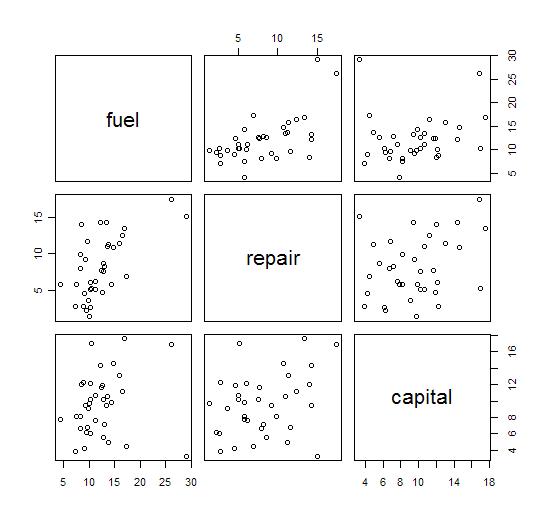
결과 해석을 해보면..
- fule(연료비), repair(수리비), capital(자본금)은 모두 양의 상관관계를 가진다.
- fule과 repair의 상관계수는 0.62
- fule과 capital의 상관계수는 0.16
- repair와 capital의 상관계수는 0.35
- 그러므로 fule(연료비), repair(수리비)가 가장 상관관계가 높다고 볼 수 있다.
- 보통 상관계수가 0.8 이상이어야 의미가 있다고 본다고 한다.
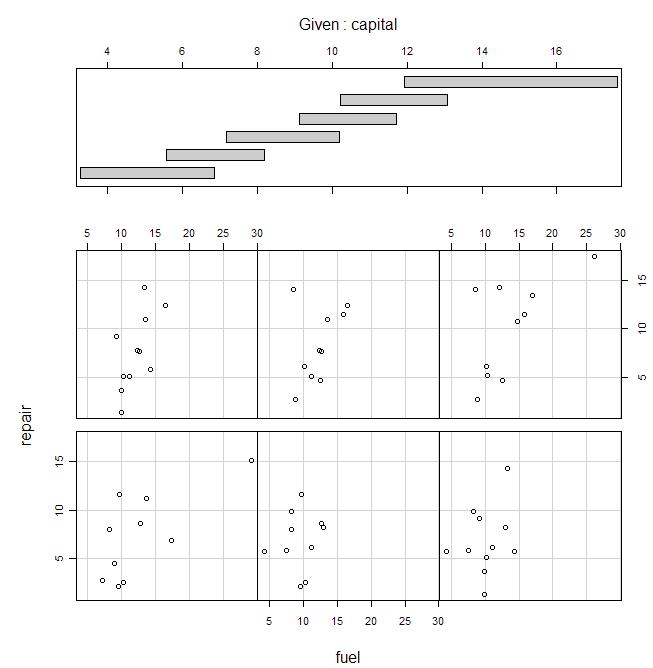
#조건부 산점도
#자본금이 조건으로 주어진 상황에서 연료비(독립변수)와 수리비(반응변수)사이의 관계
coplot(repair~fuel|capital, data=cost.d)
[edit]
4 이변량 자료의 상관계수를 그래프로 표현하기 #
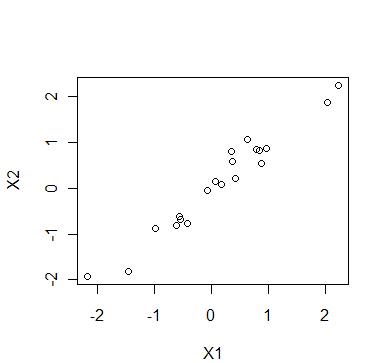
다음은 X1, X2 두 변량의 상관계수가 0.98인 난수에 대한 그래프다.
> set.seed(2)
> library(mvtnorm)
> x <- rmvnorm(20, sigma=matrix(c(1, 0.98, 0.98, 1), 2))
> x
             [,1]        [,2]
 [1,]  0.62872170  1.05125106
 [2,] -0.61625134 -0.81208810
 [3,]  2.23543105  2.23568460
 [4,]  0.36178518  0.79807392
 [5,] -0.05901189 -0.04696427
 [6,] -1.44903706 -1.81448776
 [7,]  0.85017069  0.81754232
 [8,] -0.56312456 -0.61359221
 [9,]  2.03787185  1.86925931
[10,]  0.07583804  0.13642630
[11,]  0.79101426  0.83645122
[12,]  0.96199934  0.86826634
[13,]  0.37699900  0.58472713
[14,] -0.98481735 -0.87797193
[15,]  0.88841158  0.52652788
[16,] -2.16636324 -1.92376783
[17,] -0.41200937 -0.78035322
[18,] -0.54347793 -0.67618649
[19,]  0.43040268  0.20810378
[20,]  0.17868536  0.08269170
> plot(x[,1], x[,2], xlab="X1", ylab="X2")
[edit]
5 다중상관계수 #
- 다중상관계수는 하나의 변수가 다른 여러 변수들(변수그룹)과의 상관계수를 의미한다. (선형관계)
- 0 <= 다중상관계수 <= 1
- Kshirsagar란 사람이 1972년에 맹그러서 사람 조낸 귀찮게 한다.
mcc.f<-function(x, var1, var2)
{
	s<-var(x)
	s0<-sqrt(s[var1,var1])
	s0q<-s[var1,var2]
	Sq<-s[var2,var2]

	sqrt(s0q%*%solve(Sq)%*%s0q)/s0
}
다음과 같이 위의 함수를 이용하여 다중상관계수를 구할 수 있다.
cost.d <-read.table("cost.d", header=T)
source("mcc.f")
mcc.f(cost.d, 1, c(2,3))

          [,1]
[1,] 0.6160264
결과
- 다중산관계수는 0.6160264
- 즉, fuel과 (repair, capital)의 상관관계이다.
- solve함수는 역행렬을 구하는 함수이고, %*%는 행렬의 곱이다.
[edit]
6 부분상관계수 #
두 변수 그룹간의 상관계수다. 다음의 사용자 정의 함수를 이용한다.
pcc.f<-function(x,z1,z2,x2)
{
	x<-as.matrix(x)
	s<-var(x)
	s22<-s[x2,x2]

	y1<-x[,z1]-x[,x2]%*%solve(s22)%*%s[z1,x2]
	y2<-x[,z2]-x[,x2]%*%solve(s22)%*%s[z2,x2]
	cor(y1,y2)
}
soil.d <-read.table("soil.d", header=T)
source("pcc.f")
pcc.f(soil.d, 1, 2, c(3,4))

          [,1]
[1,] 0.7475448
결과는 0.748이다. soil.d는 토양성분자료라고 한다.
[edit]
7 푸리에 급수의 표현(앤드류스 그림) #
이렇게 써먹는다.
- 다른 자료와 큰 차이를 나타내는 이상치를 발견
- 자료간의 거리 유지
- 자료의 그룹화
#앤드류스의 그림(푸리에 급수, 자료간의 거리를 거리를 유지하는 이유)
andrews.f<-function(x,v)
{

	n<-nrow(x)
	p<-ncol(x)
	nv<-length(v)

	x<-as.matrix(x)
	m<-cov.wt(x)$center
	M<-matrix(m*rep(1,n*p),n,p,byrow=T)
	d<-diag(1/sqrt(diag(cov.wt(x)$cov)))

	x<-(x-M)%*%d

	l<-100
	tt<-seq(from=-pi,to=pi,length=l);
	andr.v<-c(rep(1/sqrt(2),l))

	for(i in 1:((p-1)/2))
		andr.v<-c(andr.v,sin(i*tt),cos(i*tt))

	if( p%%2 == 0 )
		andr.v<-andr.v[-( ((p-1)*l+1): p*l )]

	andr.m<-matrix(andr.v,nrow=l,ncol=p)

	y <- andr.m%*%t(x)
	z <- matrix(0,nv*l,2)
	lab<-vector("numeric",nv*l)


	plot(rep(tt,n),as.vector(y),type="n",xlab="t",ylab="Andrews plot")
	for(i in 1:nv) {
		lines(tt,y[,v[i]])
		for(j in 1:l ) {
			z[(i-1)*l+j,1]<-tt[j]
			z[(i-1)*l+j,2]<-y[j,v[i]]
			lab[(i-1)*l+j]<-v[i]
		}
	}
	abline(h=0)
	identify(z,labels=lab)
}
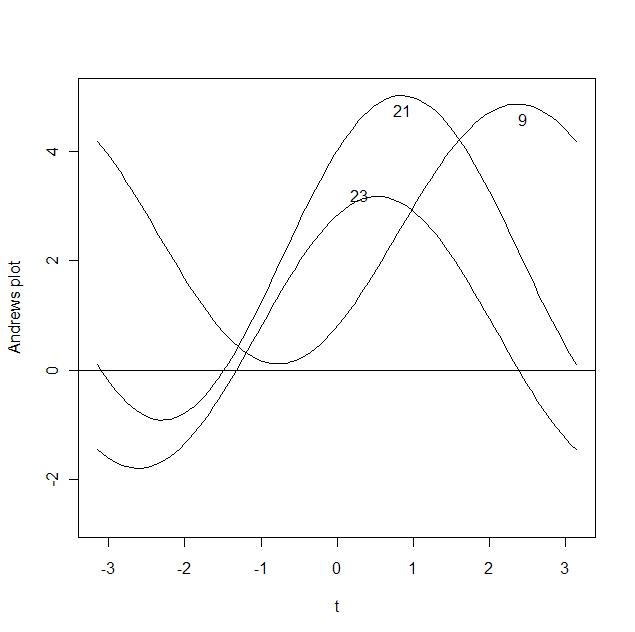
andrews.f(cost.d, c(1:36))
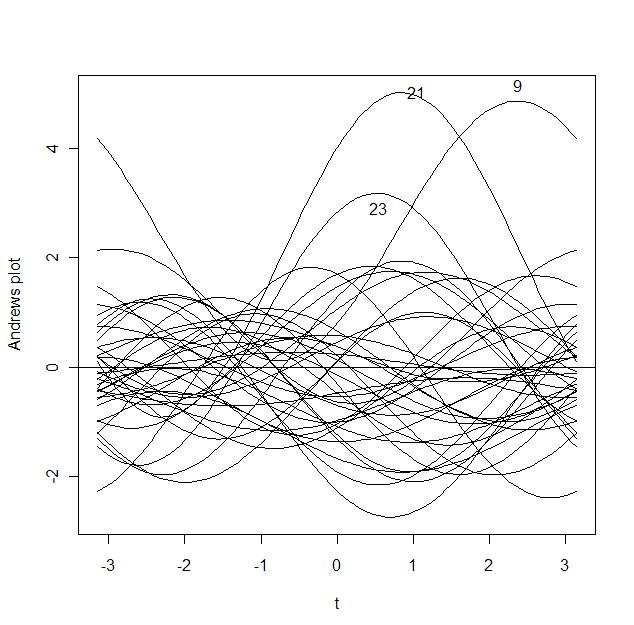
그림에서 가장 볼록하게 올라온 곡선에 마우스를 클릭하면 값이 나타난다. 9, 21은 다른 자료와 큰 차이를 보이므로 가능성이 있다. 앤드류스 그림은 9, 21, 23이면 충분하다.
andrews.f(cost.d, c(9, 21, 23))